
01
Fewer duplicate listings
Show a blue, red, and green tee as one listing with swatches instead of three near-identical cards on your collection page.
OPTIS Combined Listings is a free Shopify combined listings app. Group products you sell one per color or material into a single listing with color or image swatches, while each product keeps its own URL. No Shopify Plus required.
OPTIS Combined Listings comes from the makers of OPTIS Color Swatch Variants (5.0 ★, 800+ reviews) and OPTIS Product Options, Variant (4.9 ★, 2,300+ reviews), backed by BSS Commerce's 10+ years in eCommerce.
Selling the same item as separate products per color, material, or style makes collections look repetitive. OPTIS links those products with swatches, so shoppers switch between them like variants - without merging or deleting anything.
Show a blue, red, and green tee as one listing with swatches instead of three near-identical cards on your collection page.
Grouping is a display layer. Every product keeps its own title, images, price, SKU, and URL, so search engines index each page as before.
Auto-group by tag, collection, vendor, product type, title, metafield, or a custom condition, and groups re-sync in real time when your products change.
Manual groups, Auto Groups, bulk tools, CSV import and export, split products, and storefront display settings are all included at no cost.
Real screenshots from the OPTIS Combined Listings admin inside Shopify - every screen maps to a feature available today.
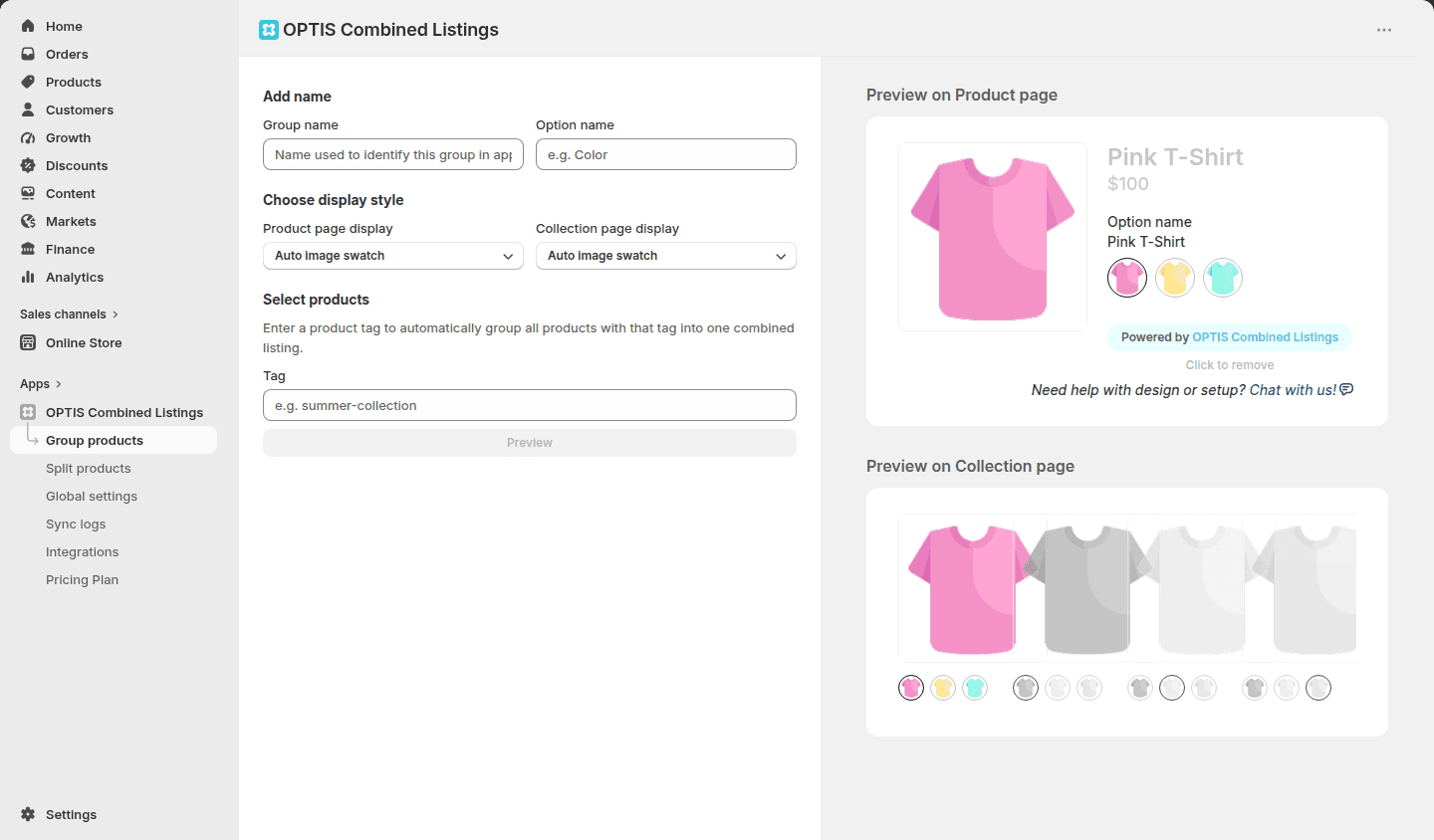
Name the group, pick a display style for product pages and collection pages separately (image swatch, custom swatch, pill, swatch card, button, or dropdown), and preview both before publishing.
Define a rule and OPTIS gathers the matching products into a group. Need more precision? Combine several conditions into one custom rule. For a few curated groups, hand-pick products manually.
When a product's tag, collection, vendor, type, title, or metafield changes, Auto Groups re-sync on their own. Prefer control? Switch to manual sync and check every run in the sync logs.
Turn each variant into its own standalone product with a dedicated title, images, and URL, then keep them linked in one group so shoppers still switch on a single listing. Your original product is never deleted.
Manage groups in a spreadsheet and import them back in one go. Moving from OPTIS Color Swatch? Import its product group export and review the groups as drafts before publishing.
Choose where swatches appear, show a Sale badge on discounted products, and let swatches scroll sideways on phones. Works with Shopify Admin and page builder apps.
A combined listings app shows separate Shopify products as one listing with swatch options. With OPTIS Combined Listings, shoppers see a swatch selector on the product page (and optionally on collection pages), and clicking a swatch opens the matching product with its own images, price, and URL. No products are merged, and your prices, SKUs, and inventory stay unchanged.
Not with OPTIS. Shopify's own Combined Listings app is available only on Plus and enterprise commerce plans. OPTIS Combined Listings works independently of it, so stores on any Shopify plan can group separate products with swatches.
No. Combining is a display feature: every product in a group keeps its own URL, title, description, and images, so search engines index each page as before and no duplicate URLs are created. If you would rather have one page rank for the whole group, you can opt in per group to set one product as the SEO canonical product.
Use Auto Groups. Create a rule that matches products by tag, collection, vendor, product type, title pattern, or metafield, or combine several of these in a custom condition. OPTIS gathers the matching products into a group and keeps it in sync when products change. For a whole catalog, bulk group by title pattern or import groups from a CSV file.
Yes, it is free today, with every feature included: manual groups, Auto Groups, bulk tools, CSV import and export, split products, and storefront display settings. A paid plan with additional premium capabilities is planned; when it arrives, the features you use today stay available. On the free plan, swatches show a small Powered by OPTIS Combined Listings badge, which the team removes on request.
OPTIS Color Swatch Variants focuses on the variants of a single product: visual color and image swatches, a gallery that shows only the selected variant's images, and swatch styling, with basic product groups included. OPTIS Combined Listings is the dedicated, free tool for grouping many separate products, with Auto Groups, real-time sync, split products, and CSV import and export. You can run both, and if you already group products in Color Swatch, you can migrate those groups with a CSV import.
OPTIS Combined Listings adds groups to your storefront through a theme app embed that you turn on in the Shopify Theme Editor, and you can move the app block anywhere on your product page template. It works with Shopify Admin and page builder apps. If your groups do not show up, contact the team through live chat.
Combined Listings links separate products. For visual swatches on the variants of a single product, pair it with our Color Swatch app.
Visual color and image swatches for Shopify variants

Group the products you already sell into one listing with swatches, keep every product URL, and let Auto Groups keep it all in sync. Free to install today.