
01
No coding, start from a template
Pick a ready-to-use template, then drag in the fields you need: name and email, text, date, number, VAT, and more. No developer and no theme edits required.
OPTIS Contact Form Builder is a free Shopify contact form app. Build contact, feedback, and registration forms with drag-and-drop fields, ready-to-use templates, multi-step layouts, and conditional logic, then manage every submission in one place.
A basic contact form covers a name, an email, and a message. When you need a quote request, a wholesale application, a customer survey, or a sign-up with several steps, OPTIS lets you build it yourself in the Shopify admin.
Pick a ready-to-use template, then drag in the fields you need: name and email, text, date, number, VAT, and more. No developer and no theme edits required.
Split long forms into steps and use conditional logic to show a field only when an earlier answer calls for it, so shoppers see a short, relevant form.
Customize color, font, and corner radius to match your brand, and send shoppers to a custom thank-you page after they submit.
OPTIS Contact Form Builder is listed as Free on the Shopify App Store. Install it and publish your first form at no cost.
Real screenshots from the OPTIS Contact Form Builder admin inside Shopify and from a demo storefront running the app.
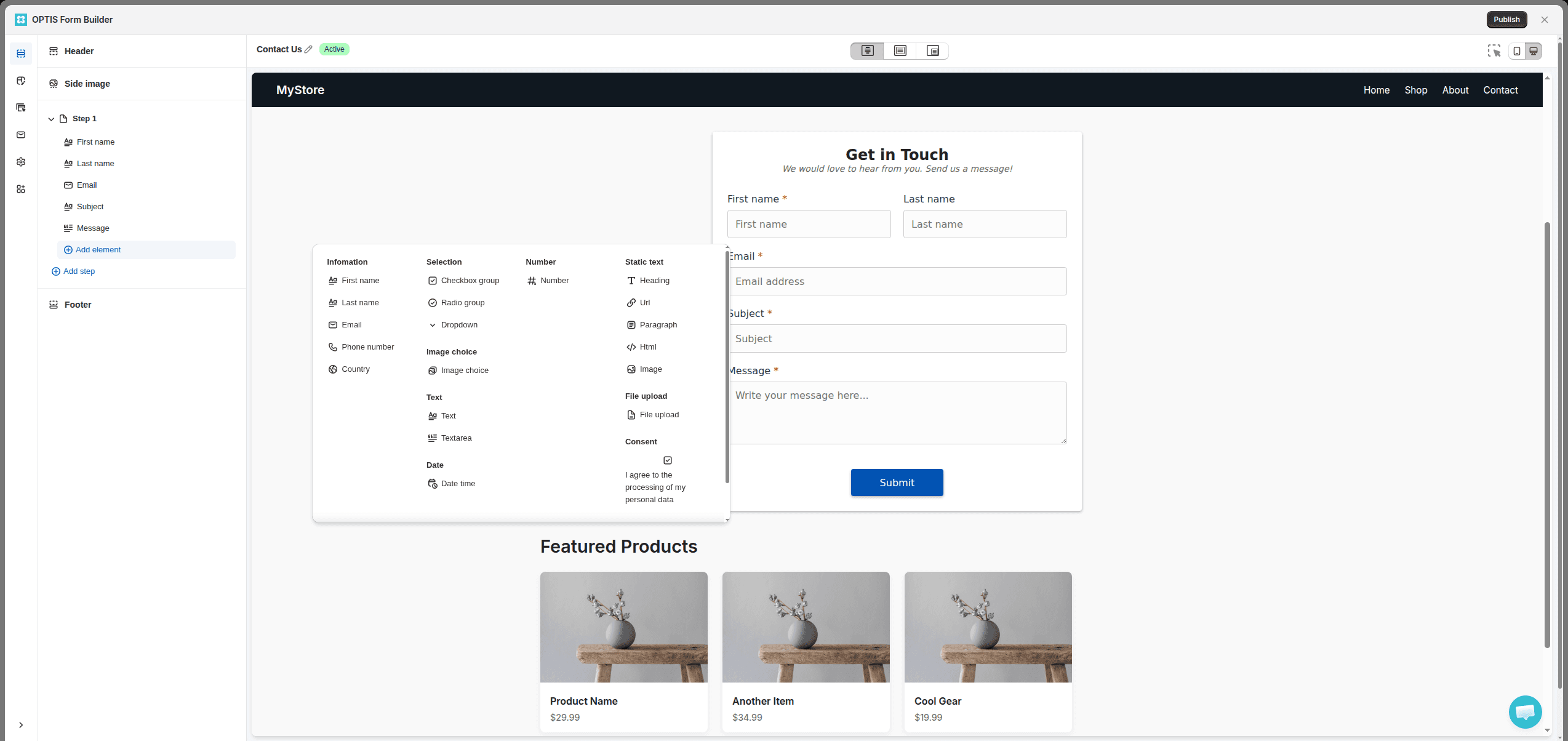
Add elements from one panel, such as first name, email, phone number, text, date, and number fields, then arrange them on a live preview of your form. Edit the header, footer, and each field in place.
Start from templates grouped into register, contact, booking, and survey forms, including Contact Us, Appointment Booking, Customer Feedback, Quote Request, and Wholesale Inquiry. Adjust any template to fit your store.
Break a long registration form into steps so shoppers fill in a few fields at a time. Add conditional logic to show or hide fields based on earlier answers.
Turn on an email that tells you about each new submission, and a confirmation email that lets the customer know you received their message.
Publish a form as a block on a page, as a screen overlay, or as a corner popup. Create a new page for the form or place it on an existing store page.
See submissions over time and by form type from the app home, then open the submissions list to review and manage each entry. Works with Shopify Flow and Shopify Admin.
This is a published form on a demo store: first name, last name, email, subject, and message, with a Submit button, sitting inside the page like part of the theme.
A registration form on the storefront shows a step indicator and asks for a few details at a time, with a Next button that moves the shopper to step two.
An appointment form on the storefront collects a phone number with a country selector plus preferred date and preferred time, using the date and time pickers of the shopper's browser.
The same form can open as an overlay above the page content, so a sign-up can greet shoppers on the home page without a separate landing page.
When the shopper submits, the form is replaced by the thank-you message you wrote, so people know the message went through.
Pick a form style such as Basic, Basic round, Line, Dawn, Premium 1, Premium 2, or Halloween, then fine-tune color, font, and corner radius from there.
The forms list shows every form with its ID, name, type, status, and creation date, plus actions to edit, preview, publish, or delete, and buttons to import or export forms.
Survey forms use radio groups and checkbox groups spread over several steps, and the preview beside the editor updates as you change a question.
You activate OPTIS Contact Form Builder from the Shopify theme editor with an app embed, so nothing is pasted into your theme files.
A published form keeps a list of where it appears. The same survey can sit on its own page as a block and show up as a corner popup on the collections page.
Yes. OPTIS Contact Form Builder is listed as Free on the Shopify App Store, so you can install it and build contact, feedback, and registration forms at no cost.
No. You build forms in the Shopify admin by choosing a template and dragging in form elements such as name, email, text, date, number, and VAT fields. Styling for color, font, and corner radius is set with simple controls, so no theme code or developer is needed.
Yes. You can split a form into several steps, which suits longer registration or booking forms, and use conditional logic so a field only appears when an earlier answer makes it relevant.
Submissions are saved in the app, where you can manage and track them in one list. Each form also has email notification settings: one email notifies you as the store admin about a new submission, and another lets the customer know their submission was received.
Yes. OPTIS Contact Form Builder works with Shopify Flow and Shopify Admin, so you can bring form submissions into the automations you already run in your store.
The app adds forms to your storefront through a theme app embed that you switch on in the Shopify theme editor. You can then show a form as a block on a page, as a screen overlay, or as a corner popup. If a form does not appear on your theme, contact the OPTIS team through live chat.
Most Shopify themes include a basic contact form with a fixed set of fields. OPTIS Contact Form Builder is for stores that need more: custom fields, multi-step layouts, conditional logic, templates for registration, booking, and feedback forms, style controls, a custom thank-you page, and one place to manage submissions.
Forms handle questions, quotes, and sign-ups. When shoppers need to personalize the product itself, add custom options right on the product page with our Product Options app.
Custom options beyond Shopify's 3-option, 2,048-variant limit

Pick a template, drag in the fields you need, match your store's style, and publish. OPTIS Contact Form Builder is free to install.